Sunday, July 7, 2019

Don’t be at Sea When it Comes to Protecting Against Mobile Phishing

Image result for Don’t be at Sea When it Comes to Protecting Against Mobile Phishing

In the early 90s, AOL flagged the first phishers who used algorithms. Fast forward 20 years and email and domain spoofing became fashionable. These were often poorly constructed with obvious design errors.
However, hackers have fine-tuned these to mirror well-known organizations, resulting in highly effective attacks. The target: naïve, unaware and unsuspecting individuals within the workforce. 
Web based phishing
From 1994, websites became SSL certified which is the security standard for a secured site. You would see the padlock icon in the browser bar which signaled the site was secured against man-in-the-middle attacks, spoofed websites, and spyware. 
Not to be outdone, the hacker collective sought another attack avenue by directly targeting https websites. As there is no central authority that monitors the creation of https sites, cyber-criminals are using this opportunity to create https-enabled phishing sites to con victims. Once clicked, the unsuspecting user is taken to a fake website which poses as the intended legitimate site.
It includes the same security padlock in the address bar, the https prefix as well as the website hosting content as normal. This gives the victim no reason to be suspicious of the website and so the user then proceeds to enter critical and sensitive information.

This method of attack has grown prevalent of late with hackers targeting the security padlocks and address bars on popular sites. Obviously, this is a major issue for those using a desktop computer. 
The threat
Unfortunately, matters are considerably worse for individuals who are using a mobile phone. With mobile devices viewed as a smaller extension of the computer, criminals have been presented with another window of opportunity to execute phishing attacks, creating a monumental challenge for both consumers and security companies.
This is highlighted by the rate people are failing for phishing attacks on mobile which has increased by an average of 85% year on year since 2011. IBM also discovered that mobile users are three times more likely to fall for a phishing attack compared to desktop users. 
Knowing if you have entered a legitimate site on a mobile can be problematic, not only because of the small screen size but also due to the fact certain browsers obscure or replace URLs with the name of the company. In some cases, the address bar is completely hidden to maximize the viewing space on the screen.
These design modifications intended to improve the user experience have inadvertently doomed consumers by giving hackers the cover to mask their phishing campaigns. 
Being mobile and protected
It has been a strenuous task to successfully to detect fraudulent https sites, but thankfully there are now security solutions available to protect users against this threat.
As a start, there must be dedicated phishing and content protection installed which can act as layer of defense that validates websites and prompts users as to whether a link is safe. This will then be relayed to the business, blocking any unauthorized access to the site and notifying of any potential threat. 
To further reduce the risk of users entering fraudulent sites, there are mobile security platforms harness that utilize AI technology, enabling them to process millions of TLS certificate events and 150,000 new domain registrations daily.
These detect, protect and remediate threats in real-time, while offering analysis and visibility into the frequency and severity of users clicking malicious links from their devices. These offerings are ideal for any business looking to reduce their overall threat sphere.
As the days go on, the risk of phishing attacks increases and with mobile devices reaching almost every corner of the business, mobile phishing attacks will almost certainly become more prevalent.
As we now operate in a post-perimeter, mobile-first world where threats are tougher to detect, it has become necessary for organizations to implement comprehensive mobile security technology to ensure protection of critical assets.

Saturday, July 6, 2019

CCNAv6.0 – ACLs Error and Solutions Example

CCNAv6.0 – ACLs Error and Solutions Example

Troubleshooting Access Control List (ACL) errors.

Using the show commands reveals most of the more common ACL errors before they cause problems in your network.
When you look at an ACL configuration, check it against known rules you learned regarding how to build ACLs correctly. Most errors occur because these basic rules are ignored.
The most common errors are entering ACL statements in the wrong order and not applying adequate criteria to your rules.
Let us look at a series of common problems and the solutions.
Error #1
Host 192.168.1.4 has no connectivity with 192.168.3.6. Can you see the error in the output of the show access-lists command?
Troubleshoot Access Control Lists errors
Solution
Look at the order of the ACL statements above, Host 192.168.1.4 has no telnet connectivity with 192.168.3.6 because of the order of rule 10 in the access list. Because the router processes ACLs from the top down, statement 10 denies host 192.168.1.4, so statement 20 does not get processed. Statements 10 and 20 should be reversed. The last line allows all other non-TCP traffic that falls under IP (ICMP, UDP, and so on).
Error #2
The 192.168.1.0 /24 network cannot use TFTP to connect to the 192.168.3.0 /24 network. Can you see the error in the output of the show access-lists command?
Troubleshoot Access Control Lists errors1
Solution – The 192.168.1.0 /24 network cannot use TFTP to connect to the 192.168.3.0 /24 network because TFTP uses the transport protocol UDP. Statement 30 in access list 102 allows all other TCP traffic. Because TFTP uses UDP, it is implicitly denied. Statement 30 should be ip any any.
This ACL works whether it is applied to Fa0/0 of R1 or S0/0/1of R3, or S0/0/0 or R2 in the inward bound direction. However, based on the rule about placing extended ACLs closest to the source, the best option is in this case is on Fa0/0 of R1 because it allows unwanted traffic to be filtered without crossing the network infrastructure.
Error #3
The 192.168.1.0 /24 network can use Telnet to connect to 192.168.3.0 /24, but this connection should not be allowed. View the output from the show access-lists command and see if you can spot a solution. Where would you apply this ACL?
Troubleshoot Access Control Lists errors2
Solution – The 192.168.1.0 /24 network can use Telnet to connect to the 192.168.3.0 /24 network, Solution – The 192.168.1.0 /24 network can use Telnet to connect to the 192.168.3.0 /24 network, because the Telnet port number in statement 10 of access list 103 is listed in the wrong position. Statement 10 currently denies any source with a port number that is equal to Telnet trying to establish a connection to any IP address. If you want to deny Telnet traffic inbound on S0/0/1, you should deny the destination port number that is equal to Telnet, for example, deny tcp any any eq telnet.
 Error #4
Host 192.168.1.4 can use Telnet to connect to 192.168.3.6, but this connection should not be allowed. View the output from the show access-lists command.
Troubleshoot Access Control Lists errors3
Solution – Host 192.168.1.4 can use Telnet to connect to 192.168.3.6 because there are no rules that deny host 192.168.1.4 or its network as the source. Statement 10 of access list 104 denies the router interface from which traffic would be leaving. However, as these packets go out from the router, they have a source address of 192.168.1.4 and not the address of the router interface.


Error #5
Host 192.168.3.6 can use Telnet to connect to 192.168.1.4, but this connection should not be allowed. Look at the output from the show access-lists command and find the error.
Troubleshoot Access Control Lists errors3
Troubleshoot Access Control Lists errors4
Solution – Host 192.168.3.6 can use Telnet to connect to 192.168.1.4 because the direction in which access list 105 is applied to an interface on R2 is incorrect. Statement 10 denies the source address of 192.168.3.6, but that address would only be the source if the traffic were outbound on So/0/0, or inbound on So/0/1.

Friday, July 5, 2019

Top 10 Tips - How to Secure Your Data


#top10tips

Tip #1 - You are a target to hackers

Don't ever say "It won't happen to me".  We are all at risk and the stakes are high - to your personal and financial well-being, and to the University's standing and reputation. 

Keeping campus computing resources secure is everyone's responsibility.
By following the tips below and remaining vigilant, you are doing your part to protect yourself and others.

Tip #2 - Keep software up to date

Installing software updates for your operating system and programs is critical. Always install the latest security updates for your devices:

Turn on Automatic Updates for your operating system.
Use web browsers such as Chrome or Firefox that receive frequent, automatic security updates.
Make sure to keep browser plug-ins (Flash, Java, etc.) up to date.
Utilize Secunia PSI (free) to find other software on your computer that needs to be updated.

Tip #3 - Avoid Phishing scams - beware of suspicious emails and phone calls

Phishing scams are a constant threat - using various social engineering (link is external) ploys, cyber-criminals will attempt to trick you into divulging personal information such as your login ID and password, banking or credit card information.

Phishing scams can be carried out by phone, text, or through social networking sites - but most commonly by email.
Be suspicious of any official-looking email message or phone call that asks for personal or financial information.
Check out our Phishing Resources section for details about identifying phishing scams and protecting yourself.

Tip #4 - Practice good password management

We all have too many passwords to manage - and it's easy to take short-cuts, like reusing the same password.  A password management program (link is external) can help you to maintain strong unique passwords for all of your accounts.  These programs can generate strong passwords for you, enter credentials automatically, and remind you to update your passwords periodically. 

There are several online password management services that offer free versions, and KeePass (link is external) is a free application for Mac and Windows.

Here are some general password tips to keep in mind:

Use long passwords - 20 characters or more is recommended.
Use a strong mix of characters, and never use the same password for multiple sites.
Don't share your passwords and don't write them down (especially not on a post-it note attached to your monitor).
Update your passwords periodically, at least once every 6 months (90 days is better).
The Protecting Your Credentials how-to article contains detailed recommendations for keeping your password safe.

Tip #5 -  Be careful what you click

Avoid visiting unknown websites or downloading software from untrusted sources.  These sites often host malware that will automatically, and often silently, compromise your computer.

If attachments or links in the email are unexpected or suspicious for any reason, don't click on it.

ISO recommends using Click-to-Play or NoScript (link is external), browser add-on features that prevent the automatic download of plug-in content (e.g., Java, Flash) and scripts that can harbor malicious code.

Tip #6 - Never leave devices unattended

The physical security of your devices is just as important as their technical security. 

If you need to leave your laptop, phone, or tablet for any length of time - lock it up so no one else can use it. 
If you keep sensitive information on a flash drive or external hard drive, make sure to keep these locked as well. 
For desktop computers, shut-down the system when not in use - or lock your screen.

Tip #7 - Protect sensitive data

Be aware of sensitive data that you come into contact with, and associated restrictions - review the UCB Data Classification Standard to understand data protection level requirements.  In general:

Keep sensitive data (e.g., SSN's, credit card information, student records, health information, etc.) off of your workstation, laptop, or mobile devices.
Securely remove sensitive data files from your system when they are no longer needed.
Always use encryption when storing or transmitting sensitive data.
Unsure of how to store or handle sensitive data?  Contact us and ask!

Tip #8 - Use mobile devices safely

Considering how much we rely on our mobile devices, and how susceptible they are to attack, you'll want to make sure you are protected:

Lock your device with a PIN or password - and never leave it unprotected in public.
Only install apps from trusted sources.
Keep your device's operating system updated.
Don't click on links or attachments from unsolicited emails or texts.
Avoid transmitting or storing personal information on the device.
Most handheld devices are capable of employing data encryption - consult your device's documentation for available options.
Use Apple's Find my iPhone (link is external) or the Android Device Manager (link is external) tools to help prevent loss or theft.
Backup your data.

Tip #9 - Install anti-virus protection

Only install an anti-virus program from a known and trusted source.  Keep virus definitions, engines and software up to date to ensure your anti-virus program remains effective.

For personally-owned systems and unmanaged UCB owned computers, the campus offers free anti-virus software, available for Windows and Mac, to current faculty, staff, and students.

Tip #10 - Back up your data

Back up regularly - if you are a victim of a security incident, the only guaranteed way to repair your computer is to erase and re-install the system.

Here are some additional tips to help keep you safe and secure online:

Use a firewall - Mac and Windows have basic desktop firewalls as part of their operating system that can help protect your computer from external attacks.

Use public wireless hot-spots wisely - follow these tips (link is external) for staying safe.

Be conscientious of what you plug into your computer (flash drives and even smartphones can contain malware).

Be careful of what you share on social networking sites.

Monitor your accounts for suspicious activity.

Bank or shop online only on trusted devices and networks - and logout of these sites when you've completed your transactions.

Beware! Playing Untrusted Videos On VLC Player Could Hack Your Computer

Image result for Beware! Playing Untrusted Videos On VLC Player Could Hack Your Computer


If you use VLC media player on your computer and haven't updated it recently, don't you even dare to play any untrusted, randomly downloaded video file on it.

Doing so could allow hackers to remotely take full control over your computer system.

That's because VLC media player software versions prior to 3.0.7 contain two high-risk security vulnerabilities, besides many other medium- and low-severity security flaws, that could potentially lead to arbitrary code execution attacks.


With more than 3 billion downloads, VLC is a hugely popular open-source media player software that is currently being used by hundreds of millions of users worldwide on all major platforms, including Windows, macOS, Linux, as well as Android and iOS mobile platforms.

Discovered by Symeon Paraschoudis from Pen Test Partners and identified as CVE-2019-12874, the first high-severity vulnerability is a double-free issue which resides in "zlib_decompress_extra" function of VideoLAN VLC player and gets triggered when it parses a malformed MKV file type within the Matroska demuxer.

The second high-risk flaw, identified as CVE-2019-5439 and discovered by another researcher, is a read-buffer overflow issue that resides in "ReadFrame" function and can be triggered using a malformed AVI video file.

vlc media player vulnerabilities

Though the proof-of-concepts demonstrated by both researchers cause a crash, a potential attacker can exploit these vulnerabilities to achieve arbitrary code execution with the same privileges as of the target user on the system.

All the attacker needs to do is craft a malicious MKV or AVI video file and trick users into playing it using the vulnerable versions of VLC.


Well, that's not a tough job, as attackers can easily target hundreds of thousands of users within hours by simply releasing malicious video files on torrent sites, mimicking as a pirated copy of a newly released movie or TV series.

According to an advisory released by VideoLAN, having ASLR and DEP protections enabled on the system could help users mitigate the threat, but developers did admit that these protections could be bypassed too.

Paraschoudis used honggfuzz fuzzing tool to discover this issue and four other bugs, which were also patched by the VideoLAN team earlier this month along with 28 other bugs reported by other security researchers through EU-FOSSA bug bounty program.

Users are highly recommended to update their media player software to VLC 3.0.7 or later versions and should avoid opening or playing video files from untrusted third parties.

Wednesday, July 3, 2019

Web application hacking in ethical hacking

Web application hacking in ethical hacking
Image result for web application hacking in ethical hacking
Ethical Hacking (EH) and Web Application Penetration Testing (WAPT) Course is IT Security (Offensive) Security Course that teaches you how to find vulnerabilities (bugs or loopholes, like coding mistakes, configuration mistakes or errors etc) in any applications and Network infrastructures including networking devices, ...

Tuesday, July 2, 2019

Why SMBs Still do not Trust Cloud Storage Providers to Secure their Data

Image result for Why SMBs Still do not Trust Cloud Storage Providers to Secure their Data

There’s no doubt that the cloud has changed the way most companies do business. It has opened up a whole new world of collaboration and productivity that now we could probably not live without.
Yet cloud adoption is continuing to raise security concerns across small- to medium-sized businesses (SMBs) — especially when it comes to storage. Naturally, when storing data in the cloud with services like Dropbox for Business, Google Drive, Microsoft OneDrive and Box, organizations might feel that their data is less secure and prone to leaking. Trusting a third party with your data just feels risky because you’re not in control of it.
IS Decisions research proves those concerns exist, with 63% of SMBs believing that cloud storage providers should do more to protect their data. What exactly are the specific issues SMBs have with data in the cloud?
They can’t detect unauthorized access
One of the biggest cloud security concerns among businesses today is the detection of unauthorized access to sensitive company files and folders.
Traditionally, when businesses store their data on on-premises file servers, they could rest assured that the data is ‘relatively’ secure from unauthorized use. The reason that it’s assumed secure is because of the need to be physically present in the office to access these files — creating a natural boundary against unauthorized access from outside the organization.
Even for employees and third-party partners using VPNs, which allow access outside of this boundary, data remains relatively secure because IT teams can restrict access to specific devices only.
With cloud-based storage, the ease of sharing data among teams coupled with the simplicity of integrating your storage with other cloud applications is significantly increasing the chance of unauthorized access — causing major security concerns for IT teams who are struggling to detect misuse.
Without the right access controls in place, if an employee’s login credentials were to fall into the wrong hands, a perpetrator could, in theory, gain access to sensitive files and folders from anywhere in the world using any device.
Businesses are worried that because they don’t have visibility of who is accessing these files, the information will end up in the wrong hands. In fact, one in five (21%) have gone as far as to say they keep their most sensitive data stored on on-premises infrastructure because they don’t trust its security in the cloud.
They struggle to stop ongoing data theft
Stopping employees who are leaving your organization from stealing sensitive company files before they leave is causing a huge amount of headache for security teams across the globe.
With on-premise storage, there’s a much higher risk of spotting someone who is attempting to steal sensitive information because the information is stored on the physical desktop computer, rather than something that can be accessed externally.
Whereas, with cloud-based storage, you can access data from anywhere in the world, using any device (even personal devices), so it’s almost too easy for ex-employees to steal information before they leave. In fact, even when that employee does officially leave, there’s still the risk that they have access to company data.
Managing complex hybrid storage environments is difficult
This issue is inherently linked to the first two — and one can argue that complex hybrid environments make the other two issues much worse.
Most businesses use a mixture of storage environments these days — both in terms of a mix of cloud storage providers and a mix of on-premises servers. While this hybrid approach helps employees become productive, it makes managing the security of the data stored across multiple environments very challenging.
Each cloud provider has a different way of managing security, and without actively monitoring access to each platform on an ongoing basis, it’s difficult to detect any malicious activity and halt data theft. Indeed, 56% of SMBs say that it’s difficult managing the security of data living in hybrid infrastructures.
What to do about it
The most effective way to ensure that your data is protected whether it’s in the cloud or on a mixture of on-premise and cloud, is to invest in technology that proactively tracks, audits and reports on all access to files and folders and alerts you in real-time and alert IT teams to suspicious file activity the moment it occurs.
If you have a solution in place that provides a consistent view of the security of your data across all your storage servers — whether on-premises or on a third-party cloud system like Dropbox for Business, Google Drive and Box — you can rest assured that if someone other than an authorized employee attempts to access your data, you’ll be the first to know about it and therefore, be able to do something about it.

What you can do with JAVA ?


Monday, July 1, 2019

The Most Influential Security Frameworks of All Time

Image result for The Most Influential Security Frameworks of All Time

Security frameworks have several components that guide companies when they develop their IT security policies and procedures. While security standards offer insight into recommended controls and guidelines go over the security measures that are ideally put in place on a network and are mandatory for compliance in some cases, a framework has security best practices that companies should follow to get the best results for implementing a successful program.
The security framework's primary goal is reducing the risk that common cybersecurity threats will impact the organization. Here are some of what I feel are the most influential security frameworks of all time.
HIPAA
The Healthcare Insurance Portability and Accountability Act dictates the way that healthcare organizations and those working with protected health information must secure their systems to ensure the confidentiality of that information. HIPAA's framework goes over the necessary security controls that companies must have in place to remain in compliance with the regulations. A failure to comply with these regulations can lead to fines and other consequences.
HIPAA's security standards provide a vastly important security framework for an industry that is incredibly vulnerable to cyber-attacks.
PCI DSS
The Payment Card Industry's Data Security Standard framework covers companies that handle credit card information in one of four ways: accepting credit cards, processing the transactions, storing this data or transmitting credit card data. By putting this security framework in place, PCI has improved the security of the complete payment process.
Payment processors are essential to modern commerce and attract countless attackers. This strict security framework makes it possible for businesses to safely handle payment information and reduce the opportunities for identity theft and fraudulent transactions.
NIST SP 800-53
The National Institute of Standards and Technology established the NIST SP 800-53 requirements for most federal information systems. This publication covers the necessary controls to put in place for all entities that use or support these systems. A substantial amount of sensitive government data moves through these networks, so having clear cybersecurity measures to follow improves the security of federal agencies and the contractors that work with them.
Federal agencies and contractors handle information that impacts the national security of the United States. Lax cybersecurity measures could have disastrous consequences, whether it's compromising military safety or allowing a hostile country to access plans for weapons. NIST SP 800-53 makes it far more difficult for state-funded actors to achieve their goals.
NIST Cybersecurity Framework
The National Institute of Standards and Technology also put together a general-use framework for any entity interested in strengthening their cybersecurity. It's designed to be cost-effective and flexible so that it's usable in many industries. It has a five-step process for addressing cybersecurity risks and maintaining a secure system: identify, protect, detect, respond, and recover. The primary components consist of the Core, Profiles, and Implementation Tiers.
The Core offers guidance to organizations wanting to get better protection for their information systems. It uses straightforward language so the business doesn't need a specialist to understand exactly what to do. The Profiles cover the company's priorities when it comes to its cybersecurity measures. It brings together the requirements, level of risk and security resources to evaluate the controls in place. The Implementation Tier helps companies establish a risk appetite and determine a budget for any cybersecurity changes that are necessary.
This security framework helps elevate cybersecurity standards for many entities that are uncertain where they should start with their cyber protection. This publication is clear on the controls that should be in place and how they benefit companies that implement them.
HITRUST
The Health Information Trust Alliance developed the Common Security Framework for healthcare organizations. These guidelines cover any information systems that work with protected health information, whether it's at rest or in transit. Many healthcare IT systems are fragmented and cybersecurity measures are not always implemented or maintained properly.
By providing concrete guidance on what to do to protect the healthcare business, more organizations can protect themselves against the constant threat of ransomware and other malware. This framework provides another way for healthcare organizations to protect themselves against attackers.
ISO 27000 Series
The International Organization of Standardization and the International Electrotechnical Commission published this standard for information security management systems. The primary focus of this set of standards is to put managers in control of the cybersecurity measures that are in place. 
The audience for this set of security standards is the private sector, and this framework has several special publications available, including 800-12, 800-14, 800-26, 800-37, and 800-53. Everything from the specific security controls to guidelines on how to effectively manage IT are included in these documents.
NERC 1300
The North American Electric Reliability Corporation created a set of security standards for Bulk Power System companies. Since the power infrastructure is so important to modern society, this security framework is put in a particularly influential position.
A few of the measures that it covers include staying on top of new patches, ensuring proper network security administration practices, and maintaining continuity of these systems.
NERC 1300 is one of the latest versions of this cybersecurity measure, which gets revisited to see whether it still applies to the modern cybersecurity landscape or if additional protections should be put in place. Losing power has a substantial impact on the public's quality of life. This framework protects these critical systems.
ANSI/ISA 62443
The International Society for Automation and the American National Standards Institute developed this security framework for Industrial Automation and Control Systems. Industrial automation is transforming many operations, especially as the Internet of Things continues to grow.
The framework consists of four categories: general, component, system, and policies and procedures. The International Security Compliance Institute helps organizations see whether they are properly adhering to this framework. They created the conformity assessment program, which offers certification for IoT equipment, Commercial Off-the-shelf products, and the systems that control them.
Industrial automation and control systems provide many efficient and productive systems for companies investing in tech-forward solutions. This framework allows forward-thinking companies to create security measures that accommodate a variety of connected devices in the industrial environment.
Security frameworks make it possible for organizations to speed up the adoption of strong cybersecurity measures. They don't need to start from scratch when working on their security practices within their company. Some of these frameworks are mandated by the industry that they operate in, while others are voluntary to offer a security foundation.

Access levels in java

Access levels in java
Image result for access levels in java
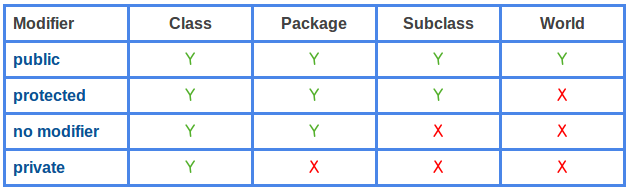
Java access level contains two parts: 1) access level for classes and 2) access level for members. For class access level, the keyword can be public or no explicit modifier(package-private). For member access levelthe keyword can be public , protected , package-private (no explicit modifier), or private .

Which Python course is best for beginners?

Level Up Your Python Prowess: Newbie Ninjas: Don't fret, little grasshoppers! Courses like "Learn Python 3" on Codecade...